A transactional notification service with NestJS and Brevo
How to structure a dedicated NestJS notification service, sync versioned HTML templates to the Brevo API, and decouple delivery through RabbitMQ.
- Engineering
- Integrations
- Architecture
The real problem is not sending an email. It is keeping consistency between what a backend service wants to send and what the email provider actually renders.
In most architectures, transactional templates live in two places at once: one in the codebase, one in the provider’s UI. One drifts from the other. After a while, nobody knows which one is correct.
The pattern used here reverses that relationship: templates are the source of truth in code. Brevo is just a send-time runtime.
The problem
A SaaS platform running multiple services — a PHP API, a NestJS BFF, an operator API — needs to send transactional emails from several entry points: account activation, member invitation, payment confirmation, password reset.
The constraints that shape the architecture:
- templates must be versioned with the codebase and reviewed in PRs
- the sending provider must be swappable without touching caller services
- caller services should not know Brevo exists, only publish a message
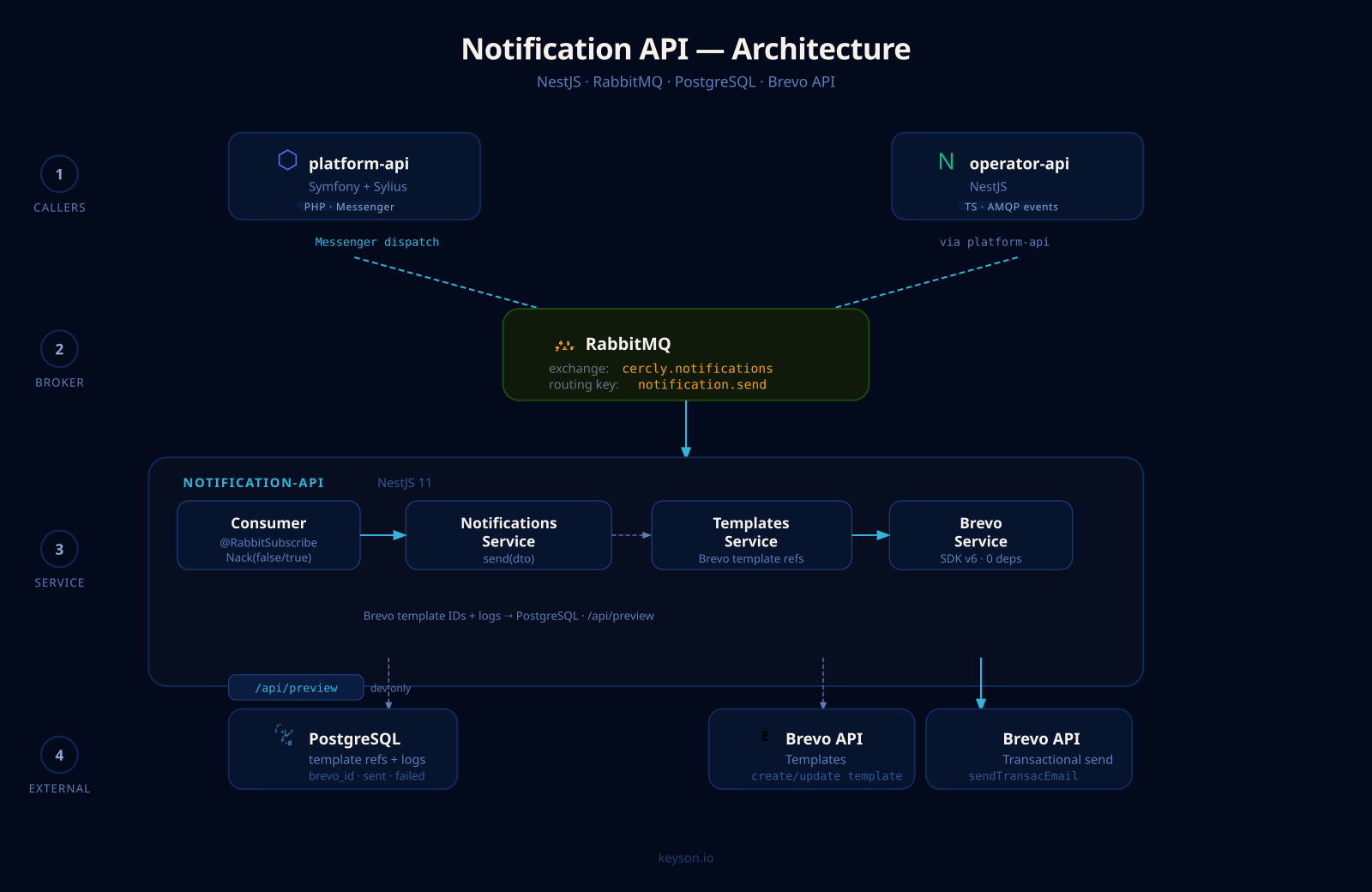
The solution is a dedicated NestJS service that owns both template management and delivery.
Templates as code
Each template is a TypeScript function that returns HTML through lightweight rendering helpers.
// src/templates/email/member-invitation.ts
import { base, h1, p, button } from "./base";

export const subject = "You have been invited to join {{ASSOCIATION_NAME}}";

export function html(): string {
  return base([
    h1("Welcome to Cercly"),
    p(
      "{{FIRST_NAME}}, you have been invited to join <strong>{{ASSOCIATION_NAME}}</strong>."
    ),
    button("Accept invitation", "{{INVITATION_URL}}"),
    p("This link expires in {{EXPIRY_DAYS}} days.")
  ]);
}
Variables are Brevo placeholders ({{VARIABLE}}). The service declares them on the template entity for validation at send time.
There are no HTML files, no emails/ directory, no separate template engine. Templates are TypeScript: compilable, testable, and reviewable like everything else.
Syncing to Brevo
On startup (or on demand), TemplatesService walks all local templates, compares content against Brevo IDs stored in the database, then creates or updates.
// src/templates/templates.service.ts
async syncAll(): Promise<void> {
  for (const [slug, mod] of Object.entries(EMAIL_TEMPLATES)) {
    const template = await this.repo.findOneBy({ slug });
    const htmlBody = mod.html();
    const brevoId = await this.brevo.syncTemplate(
      template?.brevoId ?? null,
      template?.name ?? slug,
      mod.subject,
      htmlBody,
    );
    await this.repo.upsert({ slug, brevoId, htmlBody, subject: mod.subject }, ['slug']);
  }
}
BrevoService uses the @getbrevo/brevo v6 SDK, which ships with zero transitive dependencies — eliminating the CVEs inherited from earlier versions.
// src/brevo/brevo.service.ts
async syncTemplate(brevoId: number | null, name: string, subject: string, htmlBody: string): Promise<number> {
  const sender = {
    email: this.config.getOrThrow('BREVO_SENDER_EMAIL'),
    name: this.config.get('BREVO_SENDER_NAME', 'Cercly'),
  };
  if (brevoId) {
    await this.client.transactionalEmails.updateSmtpTemplate({
      templateId: brevoId, templateName: name, subject, htmlContent: htmlBody, sender, isActive: true,
    });
    return brevoId;
  }
  const created = await this.client.transactionalEmails.createSmtpTemplate({
    templateName: name, subject, htmlContent: htmlBody, sender, isActive: true,
  });
  return created.id;
}
The Brevo numeric ID is persisted in the database. On subsequent syncs, updateSmtpTemplate is called with the known ID. If the template does not yet exist on Brevo’s side, createSmtpTemplate is used and the returned ID is saved.
Decoupling through RabbitMQ
Caller services do not talk directly to the notification service. They publish a message to a RabbitMQ exchange.
// in operator-api, publisher side
await this.amqp.publish("notifications", "notification.send", {
  templateId: NOTIF_TEMPLATE_MEMBER_INVITATION,
  recipient: { email: member.email, name: member.fullName },
  params: {
    FIRST_NAME: member.firstName,
    ASSOCIATION_NAME: association.name,
    INVITATION_URL: invitationUrl,
    EXPIRY_DAYS: "7"
  }
});
The consumer in notification-api validates the incoming message through a class-validator DTO, then delegates to NotificationsService.
// src/notifications/notifications.consumer.ts
@RabbitSubscribe({ exchange: 'notifications', routingKey: 'notification.send', queue: 'notification.send' })
async handleSend(payload: unknown): Promise<Nack | void> {
  const dto = await validateDto(SendNotificationDto, payload);
  if (!dto) return new Nack(false); // malformed message, no requeue

  try {
    await this.notifications.send(dto);
  } catch {
    return new Nack(true); // transient error, requeue
  }
}
The distinction between Nack(false) and Nack(true) is intentional: a malformed message should never loop back into the queue. A network error toward Brevo should.
What callers actually need
Caller services only need template UUIDs. These identifiers are fixed by the seed migration and declared in each service’s own .env:
NOTIF_TEMPLATE_MEMBER_INVITATION=11111111-1111-1111-1111-111111111111
NOTIF_TEMPLATE_PAYMENT_CONFIRMED=11111111-1111-1111-1111-111111111102
A service that wants to notify publishes a message, that is all. It knows nothing about Brevo, nothing about numeric template IDs, nothing about the SDK. If the sending provider changes tomorrow, only notification-api is touched.
A preview endpoint for development
To iterate on templates without pushing to Brevo, the service exposes a /api/preview route that renders HTML directly in the browser.
GET /api/preview/member-invitationEach template is displayed with interpolated sample values, so rendering can be validated without depending on the staging Brevo environment.
What this service deliberately does not do
A few intentional non-features:
- no automatic retry logic on the service side (RabbitMQ handles requeue)
- no dynamic templating on the service side (variables are resolved by Brevo at send time)
- no user preference management (no unsubscribe, no categories)
These are problems that may come later if needed. For now the service is deliberately small.