SaaS infrastructure on AWS: everything in Terraform, nothing manual
How we built Cercly's AWS infrastructure with Terraform — VPC, EC2, RDS, ECR, Route53, ACM, OIDC — so the entire production environment can be recreated with a single apply.
- Operations
- CI/CD
- Engineering
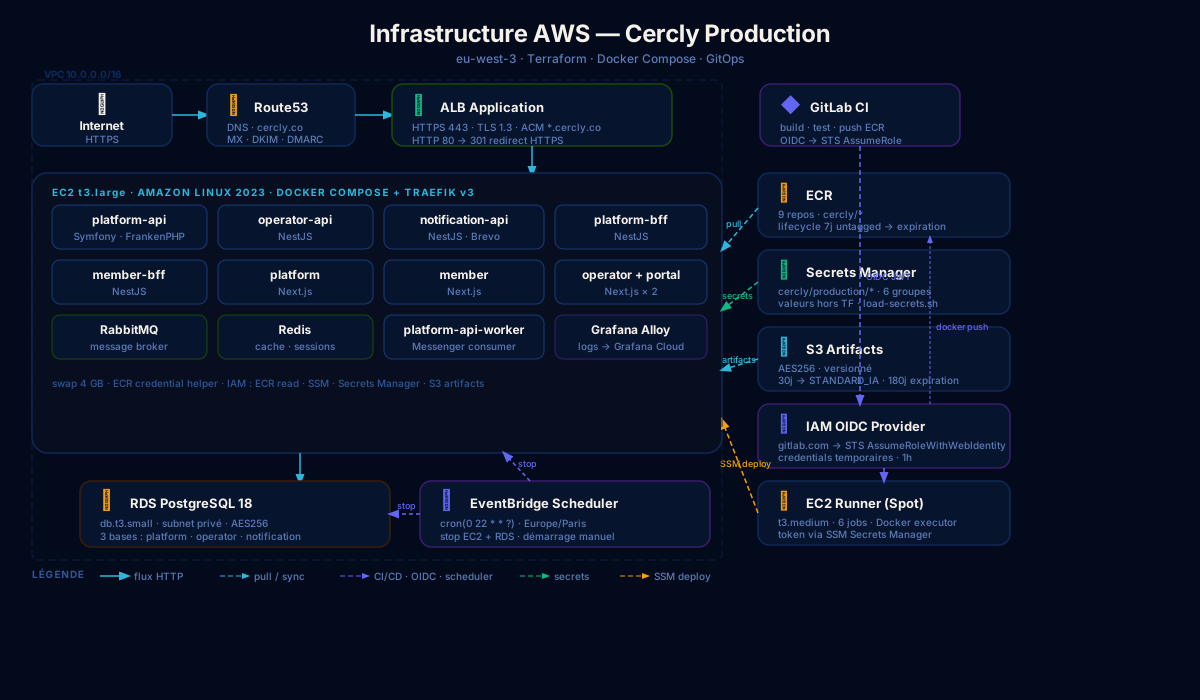
The real test of an infrastructure is being able to answer one question: if we lost everything tomorrow, how long to get back up?
For Cercly, the answer is: the time it takes to run terraform apply and a GitOps pipeline. No clicks in the AWS console, no documentation to track down, no forgotten manual steps.
This article documents the AWS architecture and the decisions that led to that result.
Overview
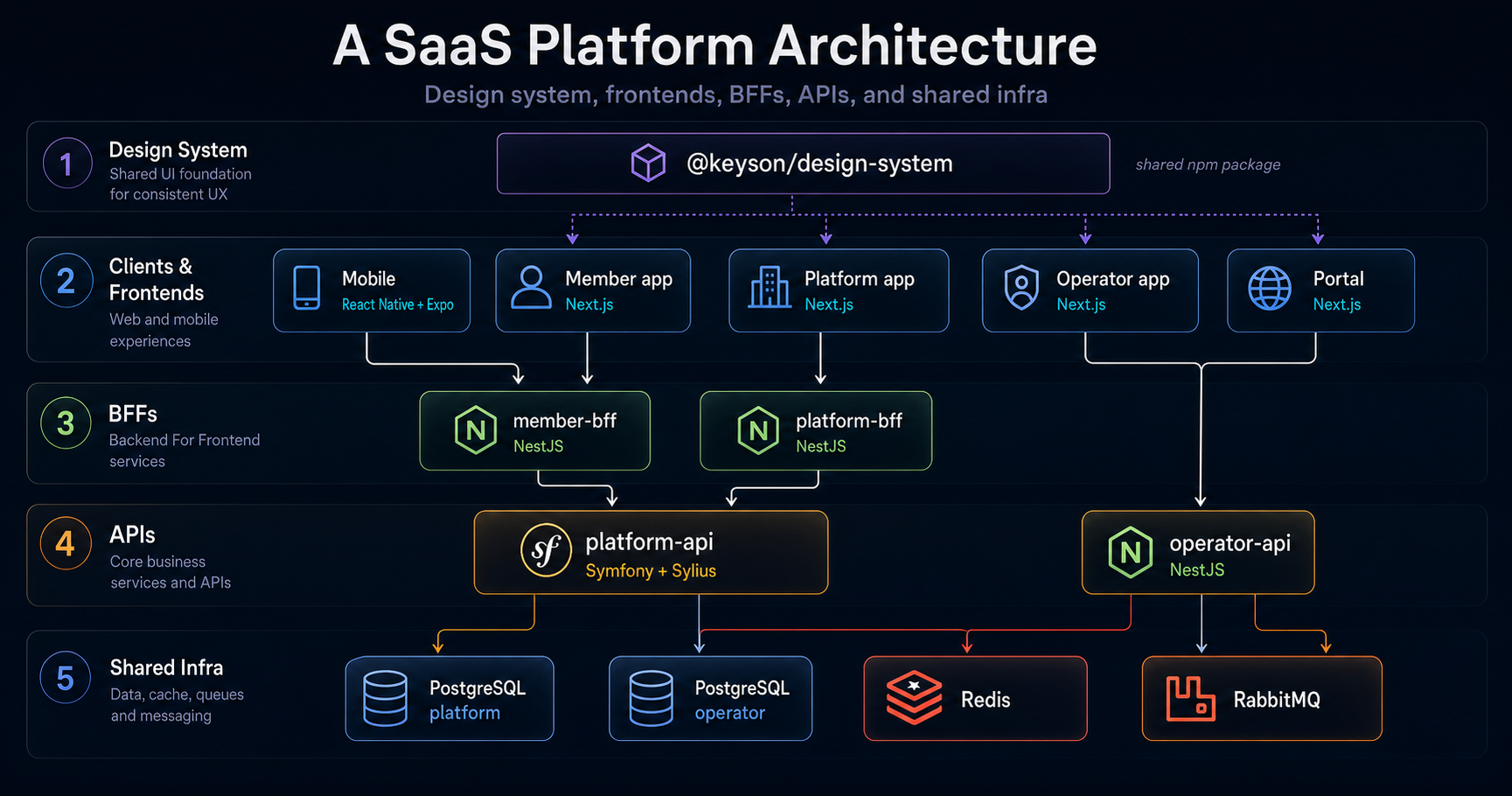
Cercly is a multi-tenant SaaS platform for associations. The infrastructure hosts two distinct environments — staging and production — in the eu-west-3 AWS region (Paris).
Internet
    ↓
Route53 (DNS)
    ↓
ALB (HTTPS, ACM certificate)
    ↓
EC2 (Docker Compose + Traefik)
    ├── platform-api         (Symfony/FrankenPHP)
    ├── platform-api-worker  (Messenger consumer)
    ├── operator-api         (NestJS)
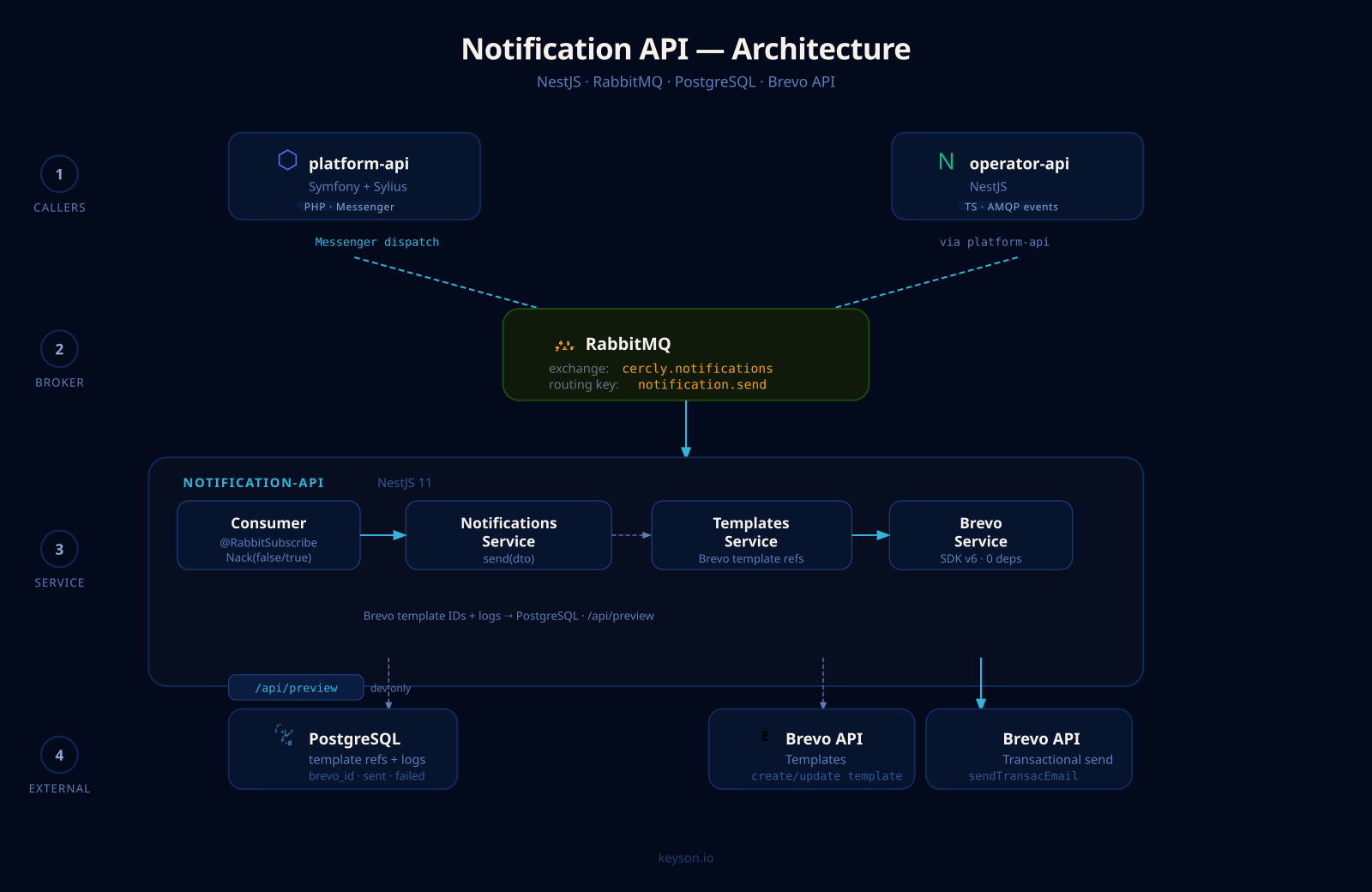
    ├── notification-api     (NestJS + Brevo)
    ├── platform-bff         (NestJS)
    ├── member-bff           (NestJS)
    ├── platform             (Next.js)
    ├── member               (Next.js)
    ├── operator             (Next.js)
    ├── portal               (Next.js — landing + tenant portal)
    ├── RabbitMQ
    ├── Redis
    └── Grafana Alloy        (logs → Grafana Cloud)
         ↓
    RDS PostgreSQL 18
A single EC2 instance per environment runs all services via Docker Compose. This is a deliberate choice for a SaaS in its growth phase: the operational complexity of a Kubernetes cluster is not justified at this stage.
What Terraform manages
Everything. That is the core constraint.
Network
# Dedicated VPC per environment
resource "aws_vpc" "main" {
  cidr_block = "10.0.0.0/16"
}

# Public subnets (ALB, NAT) and private subnets (RDS)
resource "aws_subnet" "public" { count = 2 ... }
resource "aws_subnet" "private" { count = 2 ... }
Each environment has its own VPC. Private subnets host RDS — the database is never publicly exposed.
Compute
resource "aws_instance" "production" {
  ami           = data.aws_ami.al2023.id
  instance_type = "t3.large"
  iam_instance_profile = aws_iam_instance_profile.ec2.name
  user_data = file("scripts/user-data.sh")
}
Amazon Linux 2023, Docker installed at boot via user_data. The instance has an IAM profile giving it access to ECR (image pulls), SSM (deployment without SSH) and Secrets Manager (runtime secrets).
Database
resource "aws_db_instance" "production" {
  engine         = "postgres"
  engine_version = "18"
  instance_class = "db.t3.small"
  multi_az       = false
  storage_encrypted = true
}
RDS PostgreSQL in private subnets. multi_az = false in current production — the point to evolve when the SLA justifies it.
DNS and certificates
resource "aws_route53_zone" "public" {
  name = "cercly.co"
}

resource "aws_acm_certificate" "production" {
  domain_name = var.domain_name
  subject_alternative_names = [
    "*.${var.domain_name}",
    "www.${var.domain_name}",
    "*.platform.${var.domain_name}",
    "*.member.${var.domain_name}",
  ]
  validation_method = "DNS"
}
Terraform creates the Route53 zone, issues the ACM certificate and creates the CNAME validation records — all in one pass. Mail records (MX, Brevo DKIM, DMARC) are also declared.
Containers
resource "aws_ecr_repository" "services" {
  for_each = toset(var.ecr_services)
  name     = "cercly/${each.key}"
}

resource "aws_ecr_lifecycle_policy" "cleanup" {
  for_each   = aws_ecr_repository.services
  repository = each.value.name
  policy = jsonencode({
    rules = [{
      rulePriority = 1
      selection    = { tagStatus = "untagged", countType = "sinceImagePushed", countNumber = 7 }
      action       = { type = "expire" }
    }]
  })
}
One ECR repository per service. The lifecycle policy removes untagged images after 7 days.
Secrets
Secret containers are declared in Terraform, but their values are managed outside the state — via CLI or a load-secrets.sh script at first deploy.
locals {
  sm_secrets = {
    "platform-api"     = "db_password, app_secret, stripe_secret_key..."
    "operator-api"     = "db_password, operator_jwt_secret, stripe_key..."
    "notification-api" = "db_password, brevo_api_key"
    "jwt"              = "passphrase, secret_key_path, public_key_path"
    "infra"            = "rabbitmq_password, gcloud_rw_api_key..."
    "operator-admin"   = "email, password — operator account init"
  }
}

resource "aws_secretsmanager_secret" "production" {
  for_each                = local.sm_secrets
  name                    = "cercly/production/${each.key}"
  recovery_window_in_days = 7
}
At runtime, the EC2 instance loads secrets from Secrets Manager through its IAM profile — no plaintext environment variables, no .env file on disk.
S3 artifacts
An S3 bucket serves as an intermediate store for build artifacts — deploy scripts, pre-compiled configuration files.
resource "aws_s3_bucket" "artifacts" {
  bucket        = "${var.artifacts_bucket_prefix}-${data.aws_caller_identity.current.account_id}"
  force_destroy = false
}
Server-side AES256 encryption, versioning enabled, lifecycle: transition to STANDARD_IA after 30 days, expiration after 180 days.
GitLab CI without static credentials
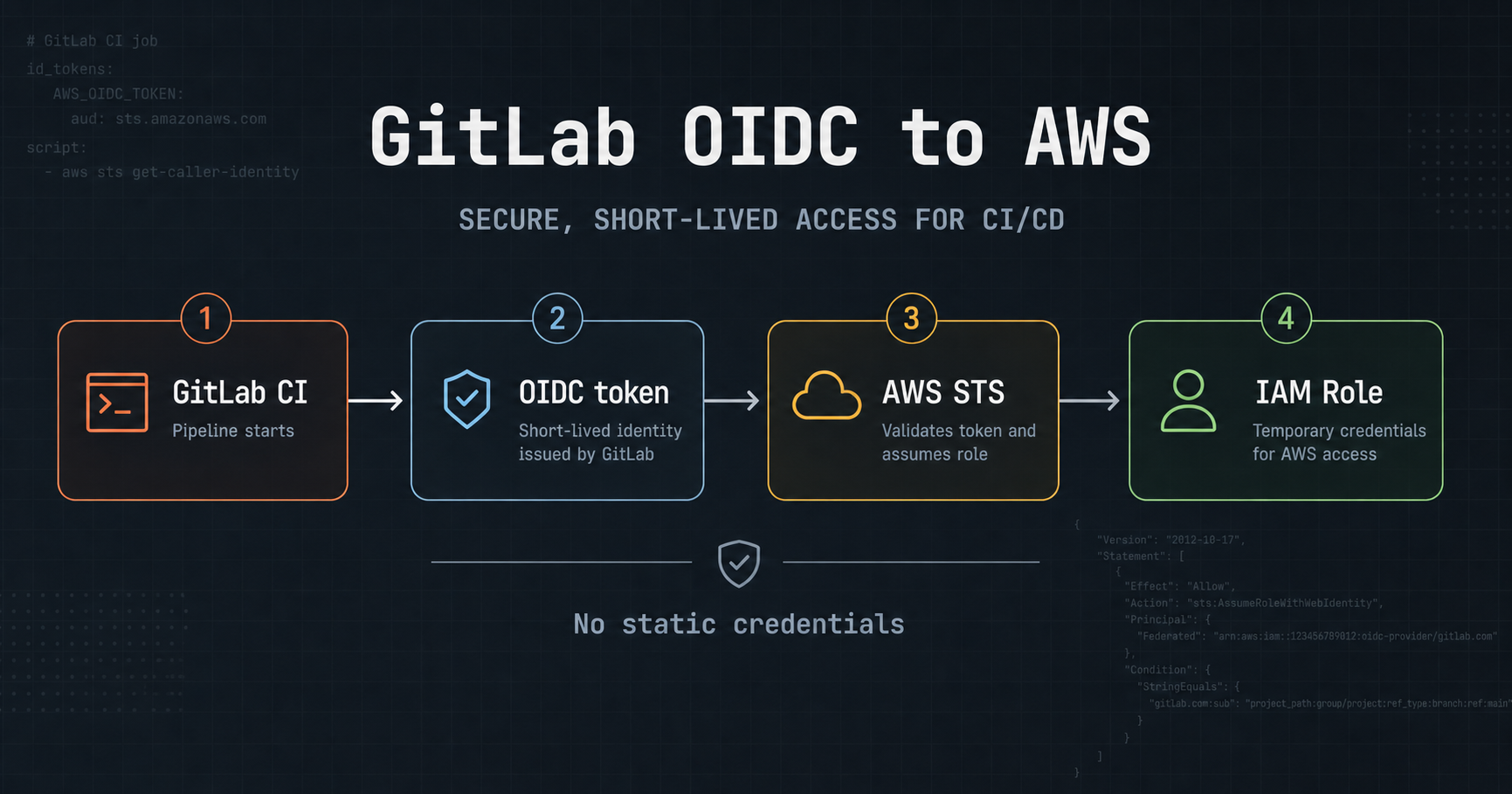
No AWS_ACCESS_KEY_ID in GitLab variables. Instead, OIDC:
resource "aws_iam_openid_connect_provider" "gitlab" {
  url             = "https://gitlab.com"
  client_id_list  = ["sts.amazonaws.com"]
}

resource "aws_iam_role" "gitlab_build" {
  assume_role_policy = jsonencode({
    Statement = [{
      Effect    = "Allow"
      Action    = "sts:AssumeRoleWithWebIdentity"
      Principal = { Federated = aws_iam_openid_connect_provider.gitlab.arn }
      Condition = {
        StringLike = {
          "gitlab.com:sub" = [
            "project_path:keyson/cercly/*:ref_type:branch:ref:main",
            "project_path:keyson/cercly/*:ref_type:tag:ref:*",
          ]
        }
      }
    }]
  })
}
Each CI job exchanges a GitLab OIDC token for temporary AWS credentials (1h). Zero secrets to rotate, zero risk of leaking through logs.
GitOps: production state lives in Git
Production deployment does not go through a CI job pushing directly. It goes through a gitops repo that declares the desired state:
infra/gitops/
├── overlays/
│   ├── production/
│   │   ├── .env.production   ← image tags
│   │   └── docker-compose.yml
│   └── staging/
│       ├── .env.staging
│       └── docker-compose.yml
└── scripts/
    └── load-secrets.sh       ← loads from AWS Secrets Manager
When a service is tagged and deployed to staging, the CI job updates .env.staging via the GitLab API. After validation, we merge to main and the same mechanism updates .env.production.
The gitops pipeline pulls ECR images, loads secrets from AWS Secrets Manager and restarts containers via SSM — without SSH, without an agent on the instance.
GitLab runner on EC2
CI jobs do not use GitLab.com shared runners. A dedicated EC2 instance runs the runner — with a Spot option to cut costs:
resource "aws_instance" "runner" {
  instance_type        = var.runner_instance_type   # t3.medium
  subnet_id            = aws_subnet.private_runner.id
  iam_instance_profile = aws_iam_instance_profile.runner.name

  dynamic "instance_market_options" {
    for_each = var.runner_use_spot ? [1] : []
    content {
      market_type = "spot"
      spot_options {
        spot_instance_type             = "persistent"
        instance_interruption_behavior = "stop"
      }
    }
  }
}
At boot, user_data installs Docker and gitlab-runner, retrieves the registration token from Secrets Manager and runs a non-interactive registration. Maximum 6 concurrent jobs.
Cost control: EventBridge Scheduler
An EventBridge scheduler automatically stops the EC2 instance and RDS every evening at 22:00 Paris time. Starting is always manual.
resource "aws_scheduler_schedule" "stop_production" {
  schedule_expression          = "cron(0 22 * * ? *)"
  schedule_expression_timezone = "Europe/Paris"

  target {
    arn      = "arn:aws:scheduler:::aws-sdk:ec2:stopInstances"
    role_arn = aws_iam_role.scheduler.arn
    input    = jsonencode({ InstanceIds = [aws_instance.production.id] })
  }
}
Three separate schedules: app EC2, runner EC2, RDS. On a staging environment running 12 hours a day instead of 24, the saving exceeds 50% on the compute line.
What this choice costs and what it delivers
A single EC2 per environment is a single point of failure. An instance failure takes down all services. That is an accepted risk at this stage.
A developer joining the project can read ec2.tf and rds.tf and understand the infrastructure in 20 minutes. No additional abstraction layer to learn.
Recreating a complete environment — VPC, EC2, RDS, DNS, certificate, ECR repositories, secrets — takes the time of a terraform apply. That is the real guarantee that the infrastructure is under control.
What comes next
The current architecture hits its limits as soon as a single service needs to scale independently. If load on platform-api spikes, there is no way to add instances without rethinking the entire Docker Compose setup.
The natural next step is an orchestration cluster. The choice between Kubernetes and Docker Swarm is still open: Kubernetes brings a richer ecosystem and a larger community, Swarm keeps the proximity with Docker Compose and reduces the learning curve. Both integrate well with Terraform and ECR.
What will not change: the images, the ECR registry, the OIDC CI/CD pipeline and RDS. The orchestration layer sits on top — the rest of the infrastructure stays intact.